
Multi-site Board
Up to 12 sites as cards. Drag to reorder, pick the metrics each card shows. The All sites view lists every property with the biggest drops on top.
SerpDeck puts Google Search Console and Analytics for all your sites on one board. It's a native Mac app that shows you what changed, why it changed and what to do next.
macOS 14 or later · Apple Silicon & Intel · Read-only Google access
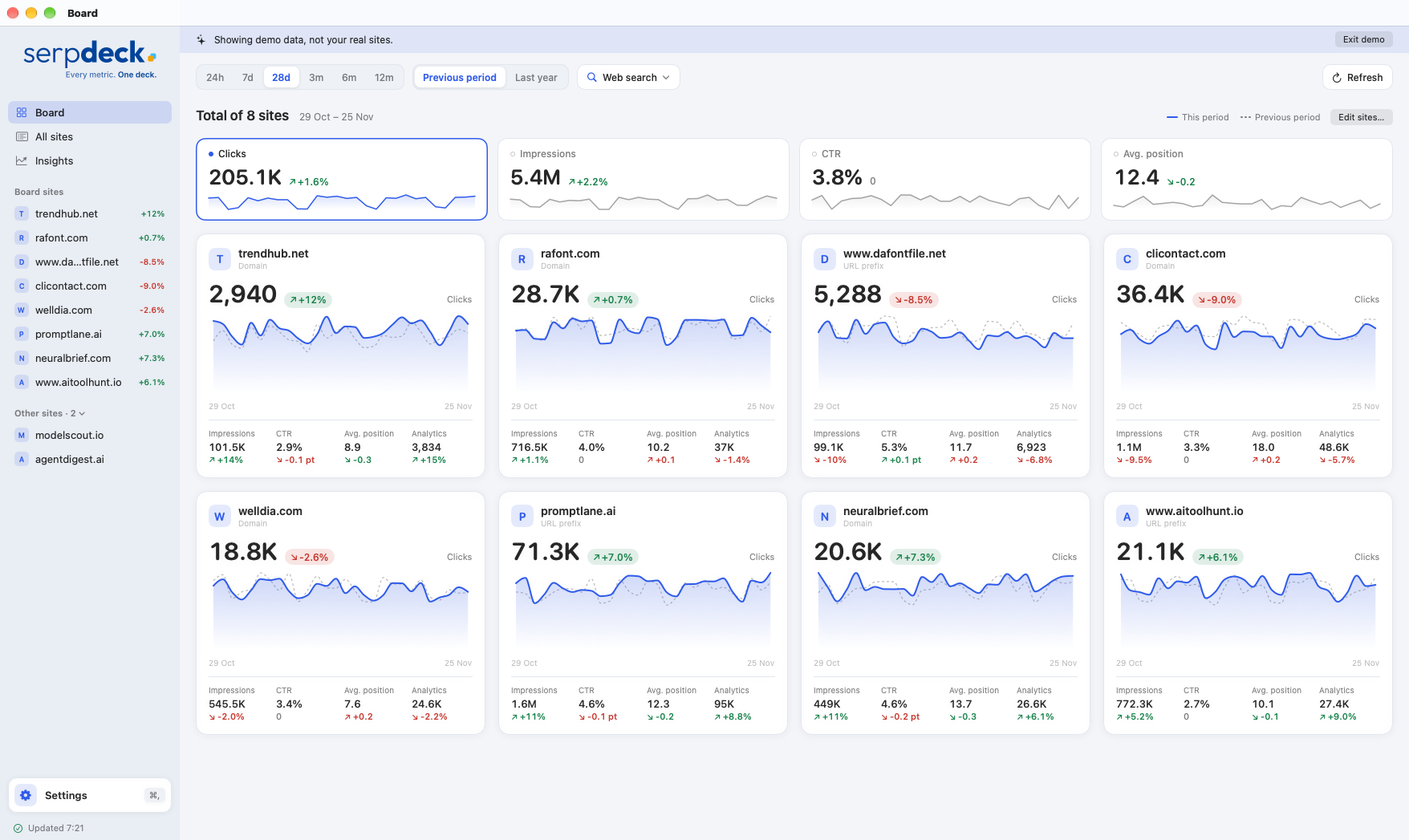
The Board with demo data: eight sites, search and Analytics side by side.
No more opening Search Console, picking a property and setting the date range for every site, then doing it all again in Analytics.
Up to 12 sites as cards. Drag to reorder, pick the metrics each card shows. The All sites view lists every property with the biggest drops on top.
Search Console shows data days late. SerpDeck shows it hour by hour, so you see what a new post or a problem did today.
Compare any period with the one before or the same weeks last year. Tell a seasonal dip from a real problem.
Double-click a page to see its queries, or a query to see which pages rank for it. Trace a loss back to the search behind it.
Ask Google from the app whether a page is indexed, when it was last crawled and which URL it chose as canonical.
Official core and spam updates appear on your charts as shaded bands. When a drop lines up with one, you see it at once.
Set a threshold, say 25%. If a site falls below it, you get a macOS notification, even when the Board isn't open.
Queries in positions 4–20 with the clicks they'd add in the top 3, high-ranking queries nobody clicks, and your pages competing for the same query.
See how a keyword performs across all your sites. Break down by country, device, channel and landing page. Export any list as CSV.
With one click, Claude evaluates your site's data. You get specific findings that name your actual pages and queries, not a checklist of generic tips.
Honest by design: small numbers are called small, noise isn't sold as a trend, and nothing uncertain is made up.
Without changing anything, SerpDeck sends about 65 requests to your site and checks what's visible from the outside.
Every finding comes with instructions to fix it, and the results can feed into the AI evaluation.
No cloud account and no server collecting your data. It travels straight from Google to your Mac and stays there.
SerpDeck can read Search Console and Analytics. It can't change anything.
Your Google credentials are stored in the macOS Keychain.
No SerpDeck server sits between you and Google.
Summary data goes to Claude only when you start an evaluation.
Site owners running a portfolio of websites.
Agencies and consultants tracking client sites.
Bloggers and e-commerce teams watching their own traffic.
Anyone who loves the data but is tired of the interface.
No. SerpDeck has no cloud account. Data goes straight from Google to your Mac. Only when you start an AI evaluation is the summary data it needs sent to Claude.
No. It connects with read-only access to Search Console and Analytics.
No. GA4 is optional. SerpDeck works with Search Console alone and matches Analytics properties automatically when you connect them.
Web, Images, Videos and News, the same types Search Console reports.
macOS 14 Sonoma or later, on Apple Silicon and Intel. It follows your Mac's light or dark appearance and lives in the menu bar.
Native macOS app for Google Search Console and Analytics 4.